Featured post
Top 5 books to refer for a VHDL beginner
VHDL (VHSIC-HDL, Very High-Speed Integrated Circuit Hardware Description Language) is a hardware description language used in electronic des...
Tuesday, 15 June 2021
Top 5 books to refer for a VHDL beginner
Monday, 7 June 2021
Effective VIM Editor tips, tricks and plugins to improve coding speed in VLSI
One of our colleagues always had to struggle with the Verilog / SystemVerilog syntax. Whenever he opens a .sv file he needs to set the syntax manually as ":set syntax=verilog". This really kills time, especially when you are working on a project with tight schedules.
Opening a fine using GVIM
Shortcuts for moving the cursor:
Shortcuts for quick editing:
How do I switch between panes in a split mode in Vim/GVIM ??
How to remove blank lines from a file?
How to implement AUTO-COMPLETION
Tuesday, 4 May 2021
UVM Interview Questions - 6
Q36: What is the Difference between UVM_ALL_ON and UVM_DEFAULT?
UVM_ALL_ON and UVM_DEFAULT are identical. As per the UVM reference manual:UVM_ALL_ON: Set all operations on (default).
UVM_DEFAULT: Use the default flag settings.
Q37: What drain time in UVM?
class test_base extends uvm_test; // ... function void end_of_elaboration_phase(uvm_phase phase); uvm_phase main_phase = phase.find_by_name("main", 0); main_phase.phase_done.set_drain_time(this, 10); endfunction // ... endclass
Q38: What is Virtual interface and how Virtual interface is used?
module top;…dut_if dif;…initial beginuvm_config_db#(virtual dut_if)::set(null, "*", "vif", dif);run_test();endendmoduleclass tb_driver extends uvm_driver #(trans1);…virtual dut_if vif;…function void build_phase(uvm_phase phase);super.build_phase(phase);// Get the virtual interface handle that was stored in the// uvm_config_db and assign it to the local vif field.if (!uvm_config_db#(virtual dut_if)::get(this, "", "vif", vif))`uvm_fatal("NOVIF", {"virtual interface must be set for: ",get_full_name(), ".vif"});endfunction…endclass
Q39: How to add a user-defined phase in UVM?
If needed a user can create user-defined phases in the UVM environment. However, this may impact the re-usability of the component. To define a custom phase user need to extend the appropriate base class for phase-type. Following are the available base classes.
class my_phase extends uvm_task_phase;
class my_phase extends uvm_topdown_phase;
class my_phase extends uvm_bottomup_phase;
You can refer to the UVM PHASE IMPLEMENTATION EXAMPLE for complete user-defined phase understanding.
Q40: How interface is passed to components in UVM?
Monday, 10 August 2020
Useful Vim plug-in for efficient coding in Perl
- Auto addition of file header
- Easy addition of function/frame comment
- Quick inclusion of default code snippet
- Performing syntax check
- Reading documentation about a function
- Converting a full code block to comment, and vice versa
- Help to speed up the code writing with consistency in coding.
The Perl-Support Vim Plugin – Perl-IDE offers the easiest way to do all of the above, saving a lot of time and keystrokes.
We have already discussed in an earlier article regarding Use of Scripting languages in VLSI
We will be covering the following in this article
1. How to install perl-support plugin to use it with VIM.
2. Powerful features of the Perl-support plugin.
Steps to install Perl-Support VIM Plug-in
1. Download the plugin from the vim.org website.
Click here to download to go to the download page
Alternatively use below command
cd /usr/src/
wget http://www.vim.org/scripts/download_script.php?src_id=9701
2. Copy the zip archive perl-support.zip to $HOME/.vim and run below command
unzip perl-support.zip
This command will create following files:
$HOME/.vim/autoload/mmtemplates/...
$HOME/.vim/doc/...
$HOME/.vim/plugin/perl-support.vim
3. Loading of plug-in files must be enabled in $HOME/.vimrc. If not use previously
filetype plugin on
Create .vimrc if there is none or use the files in $HOME/.vim/perl-support/rc as a starting point.
After done with installation lets get to know about
The Powerful Features of Perl-support
1. Add Automatic Header to *.pl file whenever you create a new file
2. Insert statements
3. Insert frequently used statements
4. Insert special variables
5. insert code snippets and manage templates
6. Run a profiler
7. Run the script, check the syntax, start the debugger
8. Make integration
Thursday, 6 August 2020
Use of Scripting languages in VLSI
- Front end RTL/Testbench code compilation and simulation flows
- Automation of running tests in regressions, generating reports, analyzing failures, debug automation
- Connectivity checks, netlist parsing, automatic generation/modification any RTL module/stubs, etc
- Synthesis, P&R tools interfacing, and back end flow.
- Several project management utilities - regression pass rates, trends, bug charts, etc - that helps in tracking projects
- Any other task that is repetitive in workflow and can be automated.
Monday, 3 August 2020
UPF - Unified Power Format
What is UPF?
When does it started?
How to use UPF in design?
Who supports it?
The below flow shows the stages of design flow and where UPF is used.
Thursday, 2 April 2020
Understanding Logic gates at transistor level : Not Gate
The input of the NOT Gate is connected at the base of the transistor and the output is taken from the collector. The transistor here acts as the switch so when the voltage is applied at the base of the transistor the transistor starts conducting and shorts the output to the ground similarly when no voltage is applied at the input the output is connected to the Vcc as shown thus in this way the circuit implements the NOT function.
Monday, 24 June 2019
Low Power Design Techniques
Different types of strategies used to reduce power consumption. Some of them are listed below.
1. Clock Gating
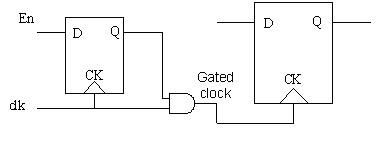
Clock being the highest frequency toggling signal contributes maximum towards the dynamic power consumption in the SoC even when the flops that are being fed by the clock are not changing their state. So, it is practical to gate the clock from reaching the set of registers or maybe some block in the design. This will ensure that there is no switching activity due to change in the clock and hence reduction in dynamic power consumption.
2. Power gating
Power gating is a technique to shut down the power of a block when it is not required to be On. i.e In Mobile voice processing block can be shut down when the user is not having an incoming or outgoing call. This is the best method of reducing power consumption.
3. Multiple Vt Library cells
Nowadays the user provides the same cells with two different threshold voltage in the library. So that synthesis tools can choose cells depending on the requirement. With low Vt, sub-threshold leakage will increase but speed will also be higher. So for timing critical path synthesis tool will insert low Vt cells and at another path high Vt cell.
4. Dynamic voltage and frequency scaling
Dynamic Voltage and Frequency Scaling (DVFS) describes the use of two power saving techniques (dynamic frequency scaling and dynamic voltage scaling). In this technique same block can be working at the different voltage at the different time .i.e some time it is required to do high computation (complex equation solver) task then it needs more speed so it can operate at high voltage. While some time low computation is required so it can operate at a lower voltage.
5. Supply voltage reduction
As power is directly proportional to voltage (p =iv), with a reduction in voltage, power consumption will reduce. But again with a reduction in voltage will reduce switching speed as well.
6. Multi-voltage design
In SOC some block ( RAM) are such which require higher speed, so that block can be powered with higher voltage. While some block (Peripheral device) which does not needs high speed so that block can be powered with lower voltage, which in turn can reduce leakage power. In earlier days people used to have the same voltage for the whole design which makes it necessary to operate at high voltage. While this new technique, we can achieve leakage reduction.
In upcoming posts, we will discuss more on UPF(Unified Power Format) and low power verification.
Sunday, 26 March 2017
Understanding real, realtime and shortreal variables of SystemVerilog
`timescale 1ns/1fs;
module test;
real a,b;
realtime t1, t2;
initial
begin
#1ns;
t1 = $realtime;
#1.8ns;
t2 = $realtime;
b = 1.8;
a = t2 - t1;
if(a == b)
$display("PASS a = %f b = %f", a,b);
else
$display("FAIL a = %f b = %f", a,b);
end
endmodule
and here is what we got the display
FAIL a = 1.800000 b = 1.800000
How that happened !!! is really 1.800000 != 1.800000 !!!!
Now let's try something else, instead of using real we use shortreal
`timescale 1ns/1fs;
module test;
shortreal a,b;
realtime t1, t2;
initial
begin
#1ns;
t1 = $realtime;
#1.8ns;
t2 = $realtime;
b = 1.8;
a = t2 - t1;
if(a == b)
$display("PASS a = %f b = %f", a,b);
else
$display("FAIL a = %f b = %f", a,b);
end
endmodule
Now the result was as expected !!
PASS a = 1.800000 b = 1.800000
`timescale 1ns/1fs;
module test;
real a,b;
shortreal c,d;
realtime t1, t2, t3, t4;
initial
begin
#1ns;
t1 = $realtime;
#1.8ns;
t2 = $realtime;
b = 1.8;
a = t2-t1;
if(a == b)
$display("Case1: PASS \na = %1.100f \nb = %1.100f", a,b);
else
$display("Case1: FAIL \na = %1.100f \nb = %1.100f", a,b);
end
initial
begin
#1ns;
t3 = $realtime;
#1.8ns;
t4 = $realtime;
d = 1.8;
c = t2-t1;
if(c == d)
$display("Case2: PASS \nc = %1.100f \nd = %1.100f", c,d);
else
$display("Case2: FAIL \nc = %1.100f \nd = %1.100f", c,d);
end
endmodule
Here is what the display is
Case1: FAIL
a = 1.7999999999999998223643160599749535322189331054687500000000000000000000000000000000000000000000000000
b = 1.8000000000000000444089209850062616169452667236328125000000000000000000000000000000000000000000000000
Case2: PASS
c = 1.7999999523162841796875000000000000000000000000000000000000000000000000000000000000000000000000000000
d = 1.7999999523162841796875000000000000000000000000000000000000000000000000000000000000000000000000000000
Sunday, 15 January 2017
2017 VLSI Symposia on VLSI Techology and Circuits
- IoT systems & technologies, including ultra-low power, heterogeneous integration, wearable devices, sensors, connectivity, power management, digital/analog, microcontrollers and application processors
- Stand-alone & embedded memories, including technology & reliability for DRAM, SRAM, (3D-)NAND, MRAM, PCRAM, ReRAM and emerging memory technologies
- CMOS Technology, microprocessors & SoCs, including scaling, VLSI manufacturing concepts and yield optimization
- RF / analog / digital technologies for mixed-signal SoC, RF front end; analog, mixed-signal I/O, high voltage, imaging, MEMS, integrated sensors
- Process & material technologies, including advanced transistor process and architecture, modeling and reliability; alternate channel; advanced lithography, high-density patterning; SOI and III-V technologies, photonics, local interconnects and Cu/optical interconnect scaling
- Packaging technologies & System-in-Package (SiP), including through-silicon vias (TSVs), power & thermal management, inter-chip communication, 3D-system integration, as well as yield & test issues
- Photonics Technology & ‘Beyond CMOS’ devices
- Digital circuits, processors and architectures, including circuits and techniques for standalone and embedded processors
- Memory circuits, architectures & interfaces for volatile and non-volatile memories, including emerging memory technologies
- Frequency generation and clock circuits for high-speed digital and mixed-signal applications
- Analog and mixed-signal circuits, including amplifiers, filters and data converters
- Wireline receivers & transmitters, including circuits for inter-chip and long-reach applications
- Wireless receivers & transmitters, including circuits for WAN, LAN, PAN, BAN, inter-chip and mm-wave applications
- Power conversion circuits, including battery management, voltage regulation, and energy harvesting
- Imagers, displays, sensors, VLSI circuits & systems for biomedical, healthcare and wearable applications
- IoT /ULP (Internet of Things / Ultra Low Power) devices: Advanced CMOS processes for ULP, design enablement, design for manufacturing, process/design co-optimization, on-die monitoring of variability and reliability
- New Computing: Artificial intelligence, ‘beyond von Neumann’ computing, machine learning, neuromorphic & in-memory / in-sensor computing
- 2D MOSFETs / New concepts for channel & gate materials: Graphene, MoS2, α-Si / poly-Si or flexible organic materials for ‘More than Moore’ devices
- Emerging memory technology & design: SRAM, DRAM, Flash, PCRAM, RRAM, and MRAM, Memristor, 3D Xpoint memory technologies
- Design in scaled technologies: scaling of digital, memory, analog and mixed-signal circuits in advanced CMOS processes
- 3D & heterogeneous integration: power and thermal management; inter-chip communications, SIP architectures and applications
Monday, 21 November 2016
Advantages of Python over Perl
Saturday, 19 November 2016
Transaction Recording In Verilog Or System Verilog
- There is no
concept of begin and end attributes All attributes are recorded with the
system task $add_attribute() or add_attribute.
1. $create_transaction_stream() is used to define a transaction stream. You can use this system task to create one or more stream objects.
module top;
integer hStream
initial begin
hStream = $create_transaction_stream("stream", "transaction");
.
.
end
.
.
endmodule
integer hTrans;
.
.
hTrans = $begin_transaction(hstream, "READ");
3. $end_transaction has a single required argument – the handle of the transaction that is to be ended. It also has a single optional argument, the time in the past that this transaction ended. After a transaction has been ended, the transaction handle can still be used to add attributes and create relations.
$end_transaction( handle transaction [, time endTime])
4. $free_transaction has a single argument – the handle of the transaction to be deleted. Once a transaction is deleted the handle becomes invalid. It cannot be used in any other recording interfaces.
$free_transaction (handle transaction)
5. $add_attribute has two required arguments – a transaction handle on which the attribute is to be created and the attribute that is to be recorded. There is one optional argument of type string named attributeName. This attributeName specifies an alias name for the attribute. If not specified, the name used for the attribute is the actual name of the SystemVerilog object.
$add_attribute( handle transaction, object attributeValue [, string attributeName])
6. $add_relation has three arguments – the first two are the two transaction handles which are related. The third argument is the string name of the relation.
$add_relation( handle sourceTransaction, handle targetTransaction, string relationshipName)
Saturday, 22 October 2016
Build smart tests using uvm_report_catcher
-
This is 8-bit microprocessor with 5 instructions. It is based on 8080 architecture. This architecture called SAP for Simple-As-Possible comp...
-
Q1: What is UVM? What is the advantage of UVM? Ans: UVM (Universal Verification Methodology) is a standardized methodology for verify...
-
Very often we come across questions from VLSI engineers that "Which scripting language should a VLSI engineer should learn?". Well...
-
There is a special Coding style for State Machines in VHDL as well as in Verilog. Let us consider below given state machine which is a “...
-
This is in continuation of our previous post on Low Power Design Techniques , where we learned about different types of strategies used to...